 DevOps Studio
Talk to your servers
You do not have to remember command syntax. Describe the outcome you want, and the assistant selects the right tool, runs it against the selected server, and explains what came back.
Ask a question
- Select a server in the sidebar so the conversation has a target
- Type in the message box at the bottom
- Press Enter to send, Shift+Enter for a new line
Useful first questions:
What is the disk usage on this server?
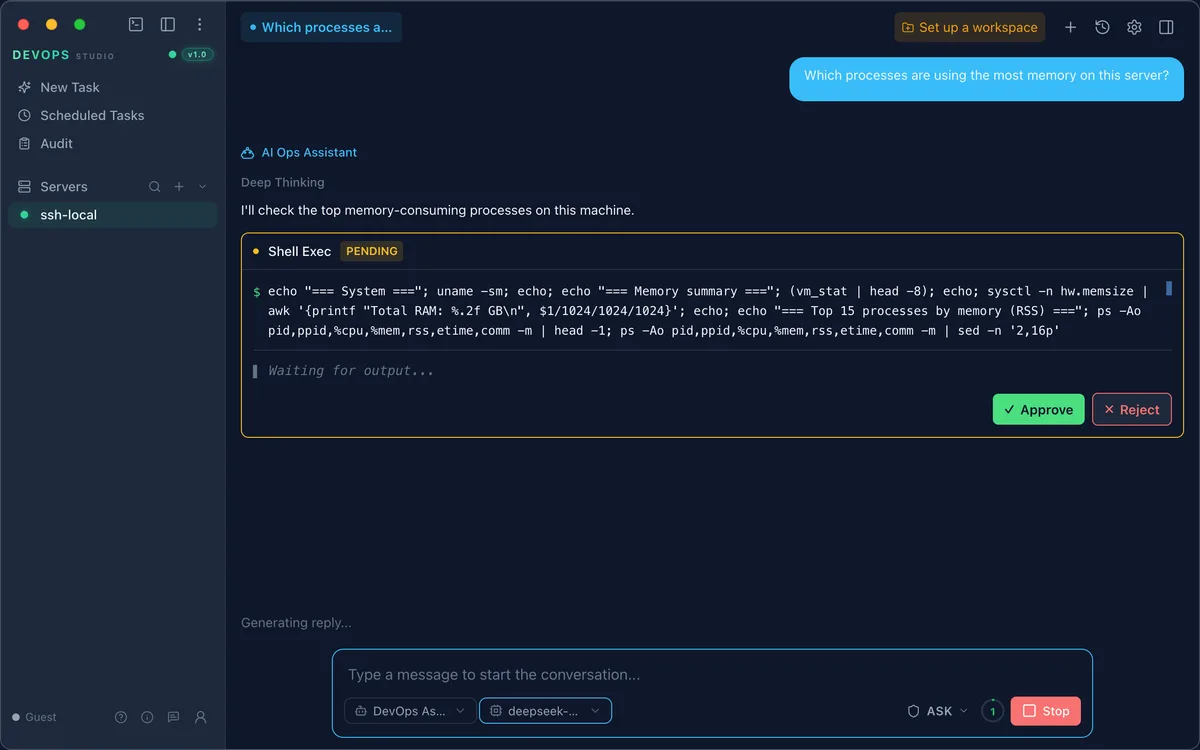
Which processes are using the most memory?
Is nginx running, and which version?
Show me the last 50 lines of /var/log/syslog
The assistant answers with the command it ran and a summary, so you can verify the result rather than take it on trust.
The four starting points
On an empty session you get four shortcuts, each pre-fills a prompt suited to the task:
| Card | Good for |
|---|---|
| Resource monitor | Disk, memory, CPU, and service health at a glance |
| Smart diagnosis | "Something is slow" — narrow down the cause |
| Deploy & push | Move files and restart services |
| Automation ops | Set up recurring checks |
Approve before it runs
In Ask mode nothing touches the server until you say so. The assistant proposes the command, shows it in full, and waits — Approve runs it, Reject discards it.
Modes
The selector next to the model name chooses how much autonomy the assistant has:
- Ask — proposes actions and asks before running anything
- Higher-autonomy modes run tools directly and report afterwards
Use Ask while you are getting familiar with a server. It is the difference between "here is what I would run" and "I already ran it".
What the assistant can see
Only the server you selected, and only through the tools the connection exposes: shell commands, file transfer, file read/write, and metrics. Conversations and tool output stay on your machine — see Data and privacy.
When the answer is wrong
Ask it to show the evidence: "which command produced that number?" Every tool call is listed in the audit log with its result and duration, so you can trace what actually happened.