 DevOps Studio
Data and privacy
The app is built around a simple rule: server operations belong to the person running them. Nothing is uploaded unless you explicitly enable it.
Stays on your machine
| Data | Where it lives |
|---|---|
| Connection settings | Your local app data directory |
| Credentials | Encrypted local store, never synced |
| Conversations | Local session files |
| Audit log | Local append-only log file |
| Scheduled jobs | Local configuration |
Nothing in the list above is sent to us. If you delete the app, it is gone.
Leaves your machine
Three things can leave the machine, with different defaults:
Model requests — when you send a message, the conversation and the relevant tool output go to the model provider you configured. This is inherent to how an AI assistant works. Your provider's terms apply to that request.
Crash reports — Off by default. When enabled, a crash sends the stack trace, app version, and OS version. Reports never include server addresses, credentials, command output, or conversation content.
Anonymous usage statistics — On by default, can be turned off. The app reports milestone counts: installed, connected a server, configured a model, first AI turn, reached a plan limit. Each event carries a random per-install identifier, the app version, and the platform — no server addresses, credentials, commands, file paths, or conversation content, and nothing is linked to your account unless you sign in yourself.
The distinction is deliberate: crash reports contain stack traces, so they wait for your explicit consent. Milestone counts contain nothing that could identify you or your servers, so they are on by default — otherwise there would be no way to tell a broken onboarding from a product nobody wants.
Turning them on or off
Open Product info from the sidebar. Both switches sit in the Legal & support card.
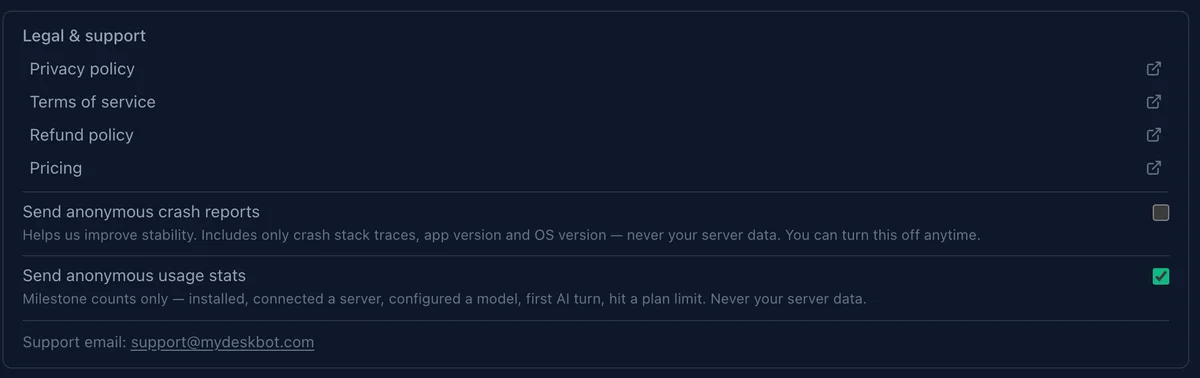
The in-app wording is:
- "Send anonymous crash reports — Helps us improve stability. Includes only crash stack traces, app version and OS version — never your server data." (off by default)
- "Send anonymous usage stats — Milestone counts only. Never your server data." (on by default)
Changing either takes effect immediately: turning usage stats off stops further events at once, and turning crash reporting on never retroactively sends anything from earlier sessions.
Feedback
Send feedback in the sidebar opens a form that submits a message to us. It includes the app version and platform so we can reproduce the issue. Attachments are opt-in and you can review what will be sent before submitting.
Policies
Removing your data
Quit the app and delete its data directory, or remove individual connections and sessions from within the app. Deleting a connection removes its stored credentials as well.