 DevOps Studio
Configure everything with a sentence
The app is AI-native rather than AI-assisted: the actions you can perform by clicking are exposed to the assistant as tools. Adding a connection, scheduling a job, or turning one off can be done by describing it in the message box.
This is not a separate path with different rules. The assistant calls the same underlying operations as the UI, so validation, storage, and audit logging behave identically.
Instead of filling in a form
Creating a connection through the dialog means eight fields. Describing it takes one line:
Add an SSH connection to 10.0.0.5, user deploy, port 22, name it staging-web
Scheduling a job through Scheduled Tasks → New Scheduled Task means a name, a trigger type, a cron expression, and instructions. The same request:
Schedule a disk check on staging-web every hour at minute 15, report anything above 80%
What happens when you ask
The assistant does not blindly write. It first inspects the current state, then acts.
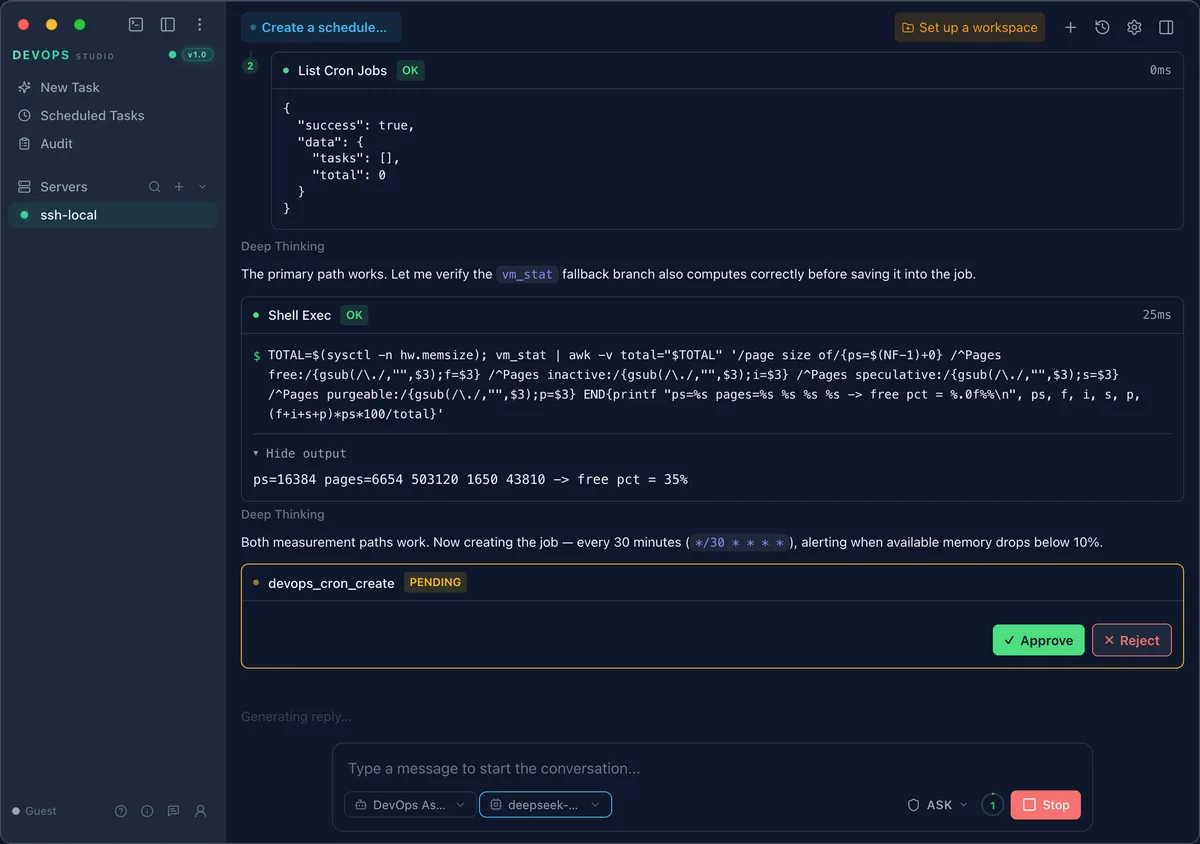
In the transcript above it does three things before writing anything:
- List Cron Jobs — checks for an existing job so it does not create a duplicate
- Shell Exec — verifies both measurement paths work on this host before baking one into a job definition
- devops_cron_create — proposes the job with the exact cron expression and waits
In Ask mode step 3 does not run until you approve it. The tool name and its arguments are shown in full — you are approving a concrete call, not a vague intention.
When the request is ambiguous
If a detail would change the outcome and you did not specify it, the assistant asks instead of guessing.
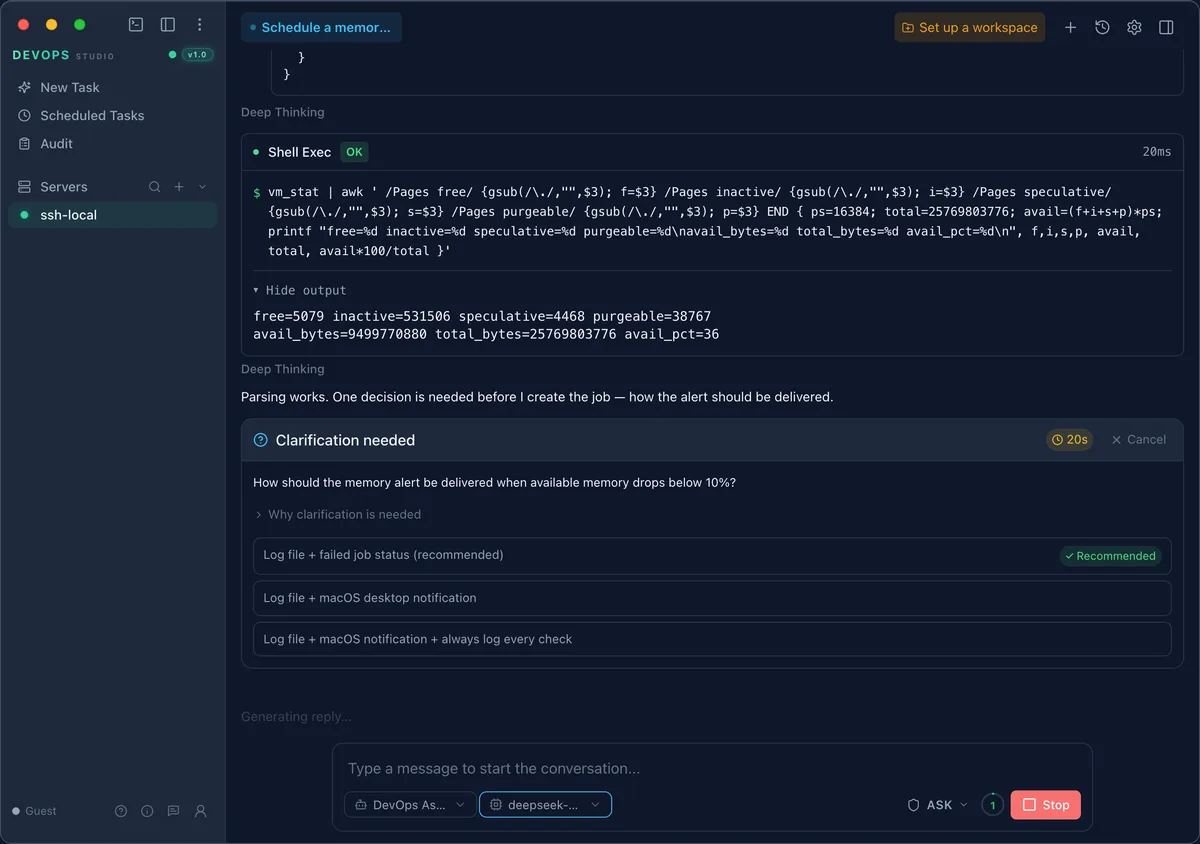
Above, it found that memory parsing worked but the alert channel was unspecified. It offers three concrete options with one recommended, plus a Why clarification is needed expander. Answer one and it proceeds; the alternative would have been inventing a delivery mechanism you never asked for.
Tools, by area
| Area | Tools |
|---|---|
| Connections & resources | devops_resource_create, devops_resource_list, devops_resource_update, devops_resource_delete, devops_connection_list, devops_connection_test, devops_connection_connect, devops_connection_disconnect |
| Scheduled jobs | devops_cron_create, devops_cron_list, devops_cron_update, devops_cron_delete, devops_cron_toggle, devops_cron_run_now, devops_cron_executions |
| Files | devops_file_list, devops_file_read, devops_file_write, devops_file_stat, devops_file_mkdir, devops_file_rename, devops_file_delete, devops_file_search, devops_file_transfer |
| Services & health | devops_service_list, devops_service_control, devops_health_check, devops_log_analysis, devops_deploy |
| Kubernetes | devops_k8s_get, devops_k8s_describe, devops_k8s_logs, devops_k8s_events, devops_k8s_apply |
| Data & history | devops_sql_query, devops_audit_query, devops_query_history_list, devops_query_history_clear |
| Execution | devops_shell_exec |
Editing and removing
The same applies to changes. Each one is a single sentence:
Disable the disk check job
Change Memory watch to run every 15 minutes instead of 30
Delete the staging-web connection
Because these are ordinary tool calls, they appear in the audit log like any other operation, with the parameters and result.
Why bother when there is a form
Forms are still there and work fine. Describing the intent wins when:
- The configuration is long — eight fields versus one sentence
- You want a guard — the assistant checks for duplicates and existing state first
- You are scripting a routine — the same sentence works repeatedly without retraining
- You may be wrong about specifics — it will ask rather than commit to a guess
Limits
The assistant cannot do anything the interface cannot. It has no privilege escalation, its writes go through the same validation, and destructive operations still require approval in Ask mode. If a request is not expressible through the tool list above, it will say so instead of improvising a shell command to work around it.